For Bushnell Launch Pro and Foresight GC3 owners

Send your launch monitor's shots to GSPro or PurePlay with a webcam.

A small USB camera in a 3D-printed hood reads the numbers your launch monitor shows after each shot and sends them to GSPro or PurePlay. Windows only.

Now plays PurePlay tooPurePlay doesn't support the Launch Pro or GC3 on its own. FreeDrop connects them, club data included.

Reads the screen, not the unitNo cable or software link to your launch monitor

Which one is for me?

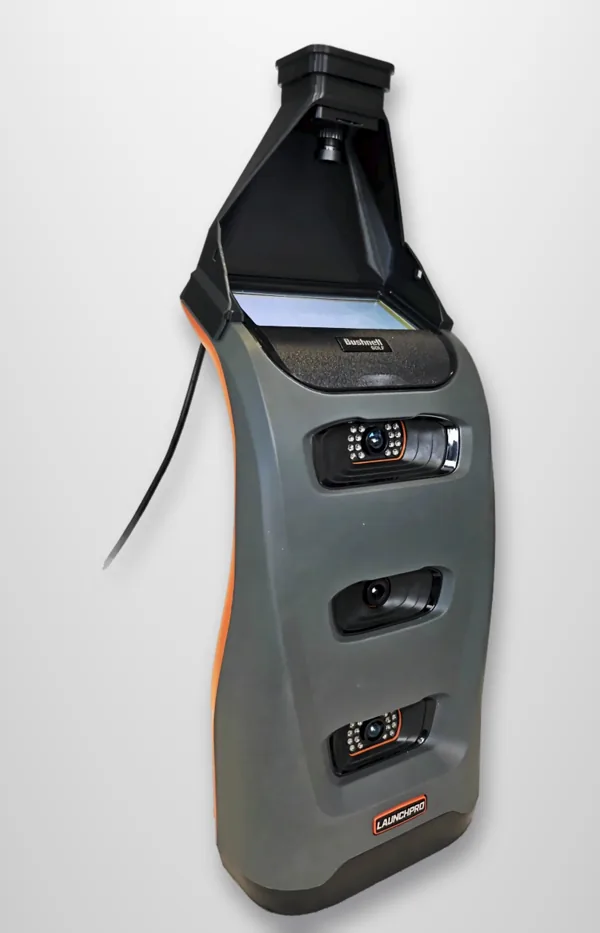
A black 3D-printed FreeDrop hood fitted on a grey Bushnell Launch Pro, the launch monitor screen visible under it

30-day satisfaction guarantee

Not happy with it? Get your money back.

Try FreeDrop on your own sim for 30 days. If you're not satisfied, for any reason, email us and we'll refund 100% of what you paid. No hoops to jump through.

DIY Kit

Full refund

All $85 back.

Ready-to-Assemble

Full refund

All $115 back.

Plug & Play

Full refund

All $250 back.

Email [email protected] within 30 days of your order (Plug & Play and Ready-to-Assemble: of delivery). The money goes back to your card. Full refund policy

How it works

Three steps. No cable to the launch monitor.

FreeDrop only looks at what your launch monitor already shows on its screen. It does not connect to the unit, open its software, or change its firmware.

  1. Fit the hood

    The camera sits in a 3D-printed hood that clips onto the top of your launch monitor and looks at its screen.

  2. Install FreeDrop

    A normal Windows installer. One-time setup in your simulator: in GSPro, switch your licence to Open API (free, and you can switch back); in PurePlay, set Settings > Launch Monitor to OpenConnect. Then start the simulator and FreeDrop.

  3. Hit balls

    Each shot's numbers are read off the screen and sent to GSPro or PurePlay. The ball flies in your simulator.

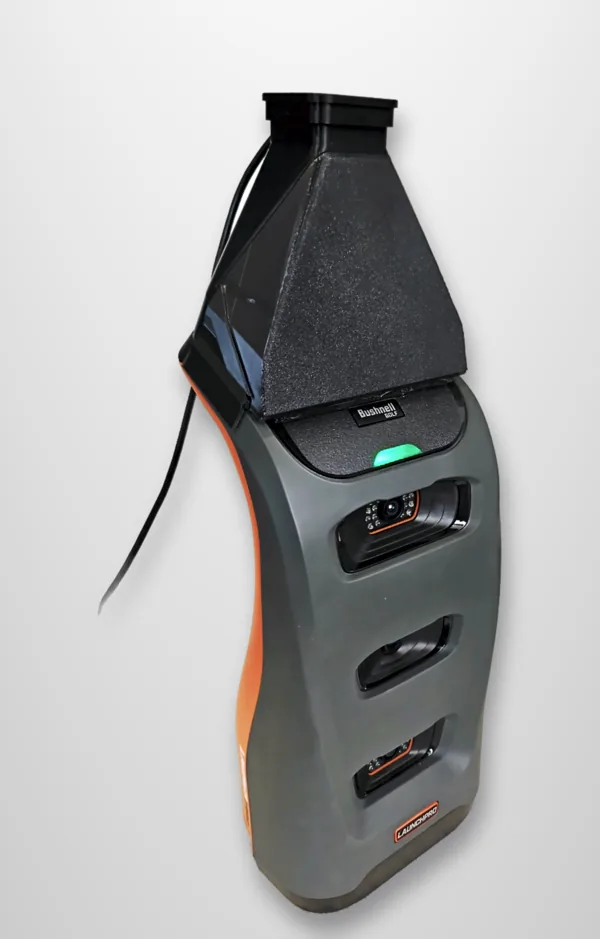
The FreeDrop hood on a Bushnell Launch Pro with its optional front glare cover fitted
With the optional front glare cover on.
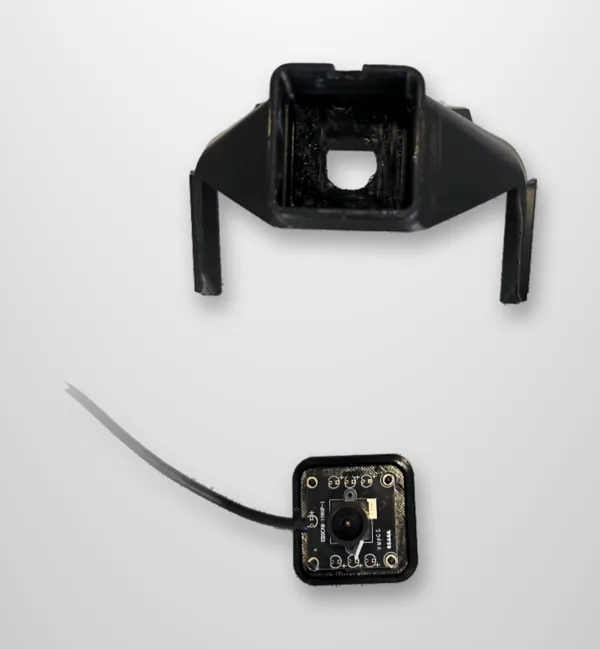
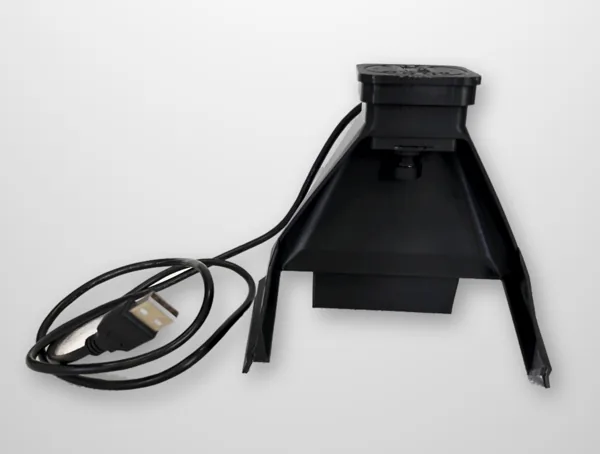
The hood top with its square camera opening, the front cover, and the USB camera board with its lens
The camera board snaps into the cap of the hood.
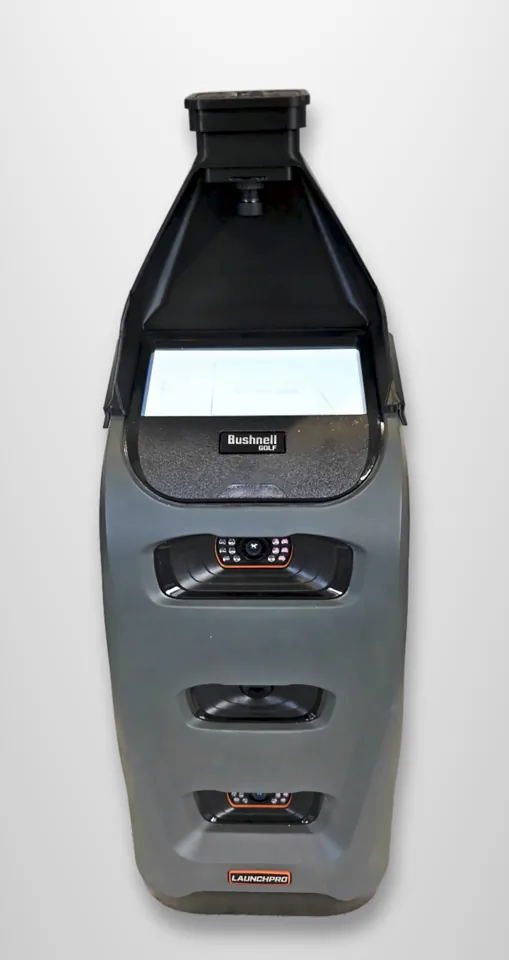
Front view of a Launch Pro with the hood over its screen
The camera looks down at the screen.
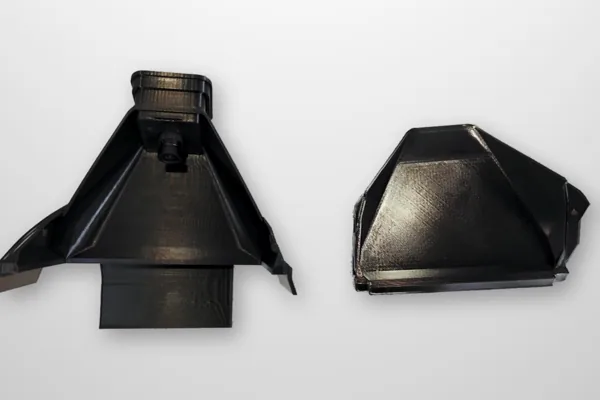
The two printed hood parts, the hood with its camera tower and the front cover, side by side
What you print in the DIY Kit.

See it in action

A real shot: the ball is hit, the launch monitor shows the numbers, FreeDrop reads them and the shot appears in GSPro (PurePlay works the same way).

A black 3D-printed FreeDrop hood fitted on a grey Bushnell Launch Pro

Choose your kit

DIY Kit, Ready-to-Assemble or Plug & Play

Same FreeDrop software and same license key either way. The difference is who prints the hood, who assembles it and who buys the camera.

Have a coupon code? Enter it on the secure checkout page.

The two printed hood parts: the hood with its camera tower and the front cover Print it yourself

DIY Kit

$85 one-time, USD

Included

  • 3D-print files for the hood, in three designs with the rear-camera one recommended (ready-made projects for a Flashforge Adventurer 5M, plus STL files for any printer)
  • Printing guide and setup guide
  • Where-to-buy-the-camera guide, with exact specs
  • FreeDrop software download for Windows
  • Your license key

All sent by email automatically after payment.

You also need

  • A 3D printer with about a 220 mm bed, and PETG filament (about 4 hours of printing on a fast printer)
  • The camera: about $20 on Amazon, and it snaps into the mount (the guide links the exact one)
  • Probably a USB-A male to female extension cable: the camera's cord is only about 3 ft
Buy the DIY Kit · $85
A printed FreeDrop hood with the camera fitted and its USB cable We print it, you assemble it

Ready-to-Assemble Kit

$115 one-time, USD

Included

  • The printed hood parts (base, front cover and camera cap), made by our print partner and shipped straight to you. No printer needed.
  • FreeDrop software download for Windows, emailed after payment
  • Your license key, in the same email
  • Assembly and setup steps in your email, and a link to the camera we tested

It ships in two parcels: the printed hood from our print partner, and the camera, which you buy yourself (about $20 on Amazon; it snaps into the mount). Hood parts usually arrive within 1 to 2 weeks of your order. Shipping is included. US addresses only. We email you the tracking number when the parts ship.

You also need

  • The camera: about $20 on Amazon, snaps into the mount (the exact one is linked in your email)
  • Probably a USB-A male to female extension cable: the camera's cord is only about 3 ft
  • A Windows PC, GSPro or PurePlay, and a supported launch monitor
Buy the Ready-to-Assemble Kit · $115
A black 3D-printed FreeDrop hood with logo cap fitted on a Bushnell Launch Pro Hand-assembled by us

Plug & Play

$250 one-time, USD

Included

  • The printed hood for the Launch Pro / GC3 housing, fully assembled with the USB camera included and fitted, shipped to your door as one parcel
  • FreeDrop software download for Windows, emailed after payment
  • Your license key, in the same email
  • Fitting and setup steps in your email, and a READ ME FIRST guide that comes with the software

Ships from Florida. Usually ships in 1 week. Shipping is included. We ship within the US only.

You still need

  • A Windows PC, GSPro or PurePlay, and a supported launch monitor. There is a one-time simulator setting to change, covered in the guide.
  • Probably a USB-A male to female extension cable: the camera's cord is only about 3 ft
Buy Plug & Play · $250

Which one is for me? If you have a 3D printer and do not mind buying a $20 camera, the DIY Kit is the cheapest way in. If you have no printer but are happy to buy the camera and click the parts together, choose the Ready-to-Assemble Kit: our print partner makes the hood and ships it to you, in a separate parcel from the camera you buy. If you want one box with the camera already fitted, choose Plug & Play, which we assemble and ship ourselves.

DIY Kit: you print and buy the camera. Ready-to-Assemble: we print, you buy the camera and assemble. Plug & Play: we print, fit the camera and ship it.

Both need a Windows 10 or 11 PC, GSPro or PurePlay, and a supported launch monitor (see below).

Secure checkout by Stripe. Pay by card; the methods you can use are shown at checkout. Software and license key by email, usually within minutes.

Compatibility

What FreeDrop works with

FreeDrop is built for the Bushnell Launch Pro and Foresight GC3 / GC3S, and sends shots to GSPro or PurePlay. It has been fitted and used on both versions of the Launch Pro: the original and the Circle B Edition (see the table). It does not work with the Bushnell Launch Pro i, which has no screen.

What has and has not been tested, honestly
Launch monitorStatusDetail
Bushnell Launch Pro (Circle B Edition)TestedThe hood has been fitted and used on this unit. Most photos on this page are of it.
Bushnell Launch Pro (original)TestedThe same hood has been fitted and used on the original Launch Pro, reading every shot into GSPro. If the FreeDrop window cuts off the screen's bottom line of numbers, nudge the hood until the camera sees the whole screen.
Foresight GC3, GC3SNot yet testedThe GC3 is described as sharing the Launch Pro's housing and screen layout, so the same hood and software should work, but we have not fitted or run it on a GC3 yet.
Foresight GCQuadSoftware onlyThe software reads the GCQuad's screen (checked on recorded video). The finished hood in these kits is for the GC3, GC3S and Launch Pro, not the GCQuad. Ask us before you buy for a GCQuad.
Bushnell Launch Pro iNot supportedIt has no screen for the camera to read.

Requires: a Windows 10 or 11 PC; GSPro (licence switched to Open API with GSPro's own tool, free and reversible according to GSPro) or PurePlay (OpenConnect setting); a launch monitor with a screen; a USB camera (the Innomaker U20CAM-1080P); and, for the DIY Kit only, a 3D printer with about a 220 mm bed. FreeDrop works with the Innomaker U20CAM-1080P camera.

Fitting a hood to your launch monitor may affect its warranty. Check with the manufacturer before fitting. 3D-printed parts can soften or warp in heat; do not leave them in a hot vehicle or direct sun. FreeDrop is an independent product. It is not made, sponsored, authorised, approved or endorsed by, or affiliated with, Foresight Sports, Bushnell, GSPro, PurePlay or any launch monitor maker or golf simulator publisher. Foresight, GC3, GC3S, GCQuad, Bushnell, Launch Pro, GSPro and PurePlay are trademarks of their respective owners and are used only to describe compatibility.

Questions

Frequently asked questions

What 3D printer do I need? (DIY Kit only)

The Ready-to-Assemble Kit and Plug & Play need no printer. For the DIY Kit you need one with a bed of about 220 mm, that can print PETG. The largest part is about 138 x 84 x 132 mm. The kit includes ready-made print projects for a Flashforge Adventurer 5M (PETG, 0.2 mm layers, about 118 g and 3 hours 40 minutes), and STL files plus settings for any other printer. Your own slicer settings may differ; the printing guide explains what matters.

Which camera do I need, and where do I buy it?

FreeDrop works with the Innomaker U20CAM-1080P USB camera (about $20 on Amazon); it snaps into the mount. It is a small USB board camera with a wide-angle lens. Other cameras are untested and may not fit the mount. Your order email links both, plus the recommended 10 ft USB extension cable. The Ready-to-Assemble and DIY kits do not include a camera. Plug & Play includes the camera.

Does it work on Mac or Linux?

No. FreeDrop is a Windows 10 and 11 program, and GSPro and PurePlay run on Windows too.

Does it work with PurePlay?

Yes. PurePlay does not support the Bushnell Launch Pro or Foresight GC3 on its own; FreeDrop connects them. FreeDrop sends each shot, with club data, through PurePlay's OpenConnect setting: in PurePlay open Settings (gear icon, top right) > Launch Monitor, set Launch Monitor to OpenConnect, then Save & Close, then start FreeDrop. Run one simulator at a time (PurePlay or GSPro). A PurePlay subscription is not included. PurePlay describes OpenConnect as a way for third-party software to connect that it does not officially support, test or provide, so PurePlay can change how it works.

FreeDrop says the simulator is not connected or not taking shots

Close FreeDrop and the simulator. GSPro: start GSPro, open Settings (top right), the Game tab, then System, and click Reset GSPro Connect; close GSPro completely, start it again and choose Open API if it asks. PurePlay: check Settings > Launch Monitor still shows OpenConnect. Then start FreeDrop again. The setup guide has pictures of each GSPro step.

Do I need GSPro or PurePlay?

Yes, one of them; neither is included. GSPro: a GSPro licence is not included and is bought separately from GSPro. FreeDrop talks to GSPro through its Open API, so your licence needs to be the Open API type. According to GSPro, switching is free, uses the licence key you already have, and can be reversed. The setup guide walks through it. GSPro and PurePlay can change how their connections work; that is outside our control. PurePlay: a PurePlay subscription; in its Settings > Launch Monitor choose OpenConnect.

How does the license key work? Can I reinstall?

You get one license key per order, in your email with the download links. You type it into the installer. Reinstalling on your own PCs, for example after a Windows reinstall or on a new computer, is fine; keep your email. The key is for your own use and is not for passing the installer to other people.

Lost your email? The resend form emails fresh links to the address you ordered with. Download links last 7 days; the form makes new ones.

Windows says "Windows protected your PC". Is that normal?

Yes. Windows SmartScreen can show this the first time you run a new installer. Choose "More info", then "Run anyway". Some antivirus programs or Windows 11 Smart App Control may block it; the guide explains what to do, or email us.

How accurate is it?

FreeDrop reads values optically, so lighting, reflections, camera position or damage can occasionally cause a missed or misread shot. Strong direct sunlight on the screen is the known weak spot. Check the numbers FreeDrop shows. The software has been tested by its maker on recorded video of launch monitor screens and on Launch Pro units (the original and the Circle B Edition). We do not publish an accuracy percentage and we do not promise perfect accuracy. Always check the numbers against the launch monitor's screen.

Some shots come through with one or two numbers missing. Why?

If only one or two values are missing (for example club path or club speed) while the rest arrive, it is almost always a reflection on the launch monitor's screen that hides those digits from the camera. Reposition the unit, change the lighting in the room (move or dim a lamp, close a blind, switch off a light that shines at the screen), or fit the optional glare cover. FreeDrop alerts you when glare on the screen is a problem. See the install guide.

Which settings should my launch monitor be on?

We recommend leaving the launch monitor on its standard (default) settings: speed in mph, distance in yards, and spin shown as Total spin + Spin axis (on the launch monitor: Settings, Units: MPH, YARDS, TOTAL/AXIS). FreeDrop also works when the launch monitor is set to km/h, m/s, meters or Side spin + Back spin, and converts those numbers automatically for GSPro or PurePlay. If some shots intermittently don't come through or don't read correctly, switch the launch monitor back to its default settings first: FreeDrop reads them most reliably.

The camera is plugged in but FreeDrop gets no picture. What do I do?

Plug the camera into a different USB port, ideally one on the back of the PC. Some ports, often the front-panel ports or a monitor's USB ports, go through a small hub chip inside the PC that cannot always run the camera: Windows then lists the camera but it sends no picture, or Device Manager shows it with "This device cannot start (Code 10)". A loose or worn USB extension cable causes the same problem (the picture stutters, stops after a while, or the camera disappears): push it in firmly, or plug the camera straight into the PC to check, and replace the extension if that fixes it. Unplug, wait a few seconds and plug it into the other port; FreeDrop finds the camera again by itself.

What is the refund policy?

If you are not satisfied, for any reason, ask within 30 days and we refund 100% of what you paid, whichever kit you bought. Details are on the refund policy page.

Shipping and delivery times

Plug & Play is assembled and shipped by hand from Florida, usually within 1 week of your order. Shipping is included. We ship within the US only. You get the software and license key by email after payment, before the hardware arrives. The DIY Kit is digital only and nothing ships.

The Ready-to-Assemble Kit ships in two parcels. The printed hood parts are made and shipped by our print partner directly to the address you gave at checkout, usually within 1 to 2 weeks, and we email you the tracking number when they ship. You buy the camera yourself, so its delivery time depends on the seller you choose. Shipping is included. US addresses only. Your software and license key arrive by email within minutes of payment.

When do I get the software and files?

Automatically by email, usually within a few minutes of paying. If you do not see it, check your spam folder, then use the resend form or email support.

Will the hood void my launch monitor's warranty?

We cannot say. Fitting any accessory may affect a product's warranty or your rights under its maker's terms, so check with the manufacturer first. You are also responsible for following the terms of your launch monitor, its app and your simulator (GSPro or PurePlay).